Minimal CI CD setup with Flutter and GitHub Actions — Part 3
Minimal CI CD setup with Flutter and GitHub Actions — Part 3
Minimal CI CD setup with Flutter and GitHub Actions — Part 3
Please read part 1 _and_ part 2 _to understand initial setup of Github Action._
Let’s continue,
1. Build Apk
We will use flutter build apk and flutter build ipa to build the APK and IPA files
# Create android apk
- name: Build apk
  run: flutter build apk
Note: We can not generate an IPA without signing it, I will be covering signing the Apk and IPA and publishing to the Play Store and app store in the upcoming articles.
2. Send builds to testers using Firebase distribution
We are going to use a GitHub action called firebase-app-distribution.
Please add the following step in .yml file.
# Upload apk to Firebase distribution
- name: Upload apk to Firebase distribution
  uses: wzieba/Firebase-Distribution-Github-Action@v1.7.0
  with:
    appId: ${{ secrets.FIREBASE_APP_ID_ANDROID }}
    serviceCredentialsFileContent: ${{ secrets.FIREBASE_TOKEN }}
    groups: all_testers
    file: build/app/outputs/flutter-apk/app-release.apk
Did you notice ${{ secrets.FIREBASEAPPIDANDROID }} and ${{ secrets.FIREBASETOKEN }} ? These are called Github Action Secrets. We can use secret keys and values in our actions without exposing them.
The app ID can be found on your general settings page of the Firebase console.
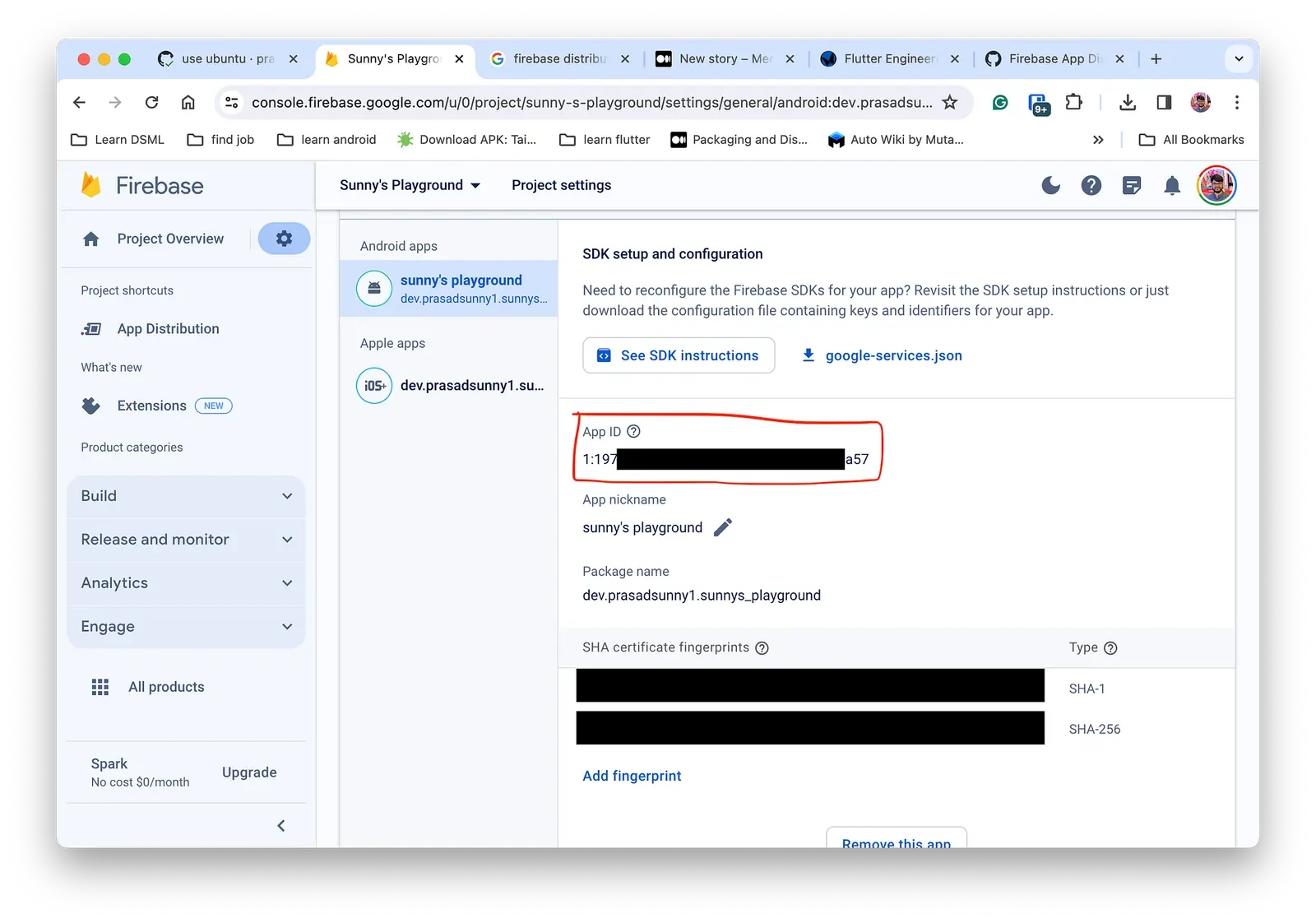
App Id can be found on Firebase’s general settings
Follow Stephen Oyebanji’s article to generate a Credential file from Google Cloud Console.
Now set both the values to Github Secrets.
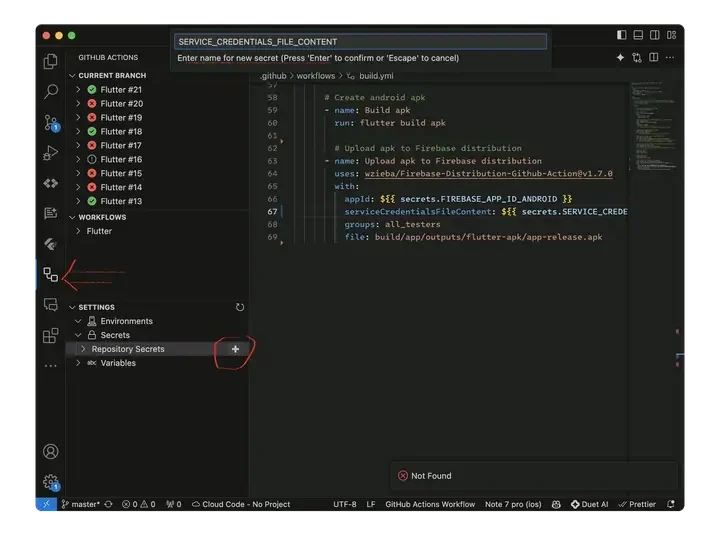
This is how to set GitHub action secret
We also need to install and setup java 11 by adding an action as follows.
# Sets up java 11
- uses: actions/setup-java@v4
  with:
    distribution: 'zulu'
    java-version: '11'
After pushing all the changes, it should run in GitHub action.
The Firebase action was successful and it published the apk as seen in the Firebase console.
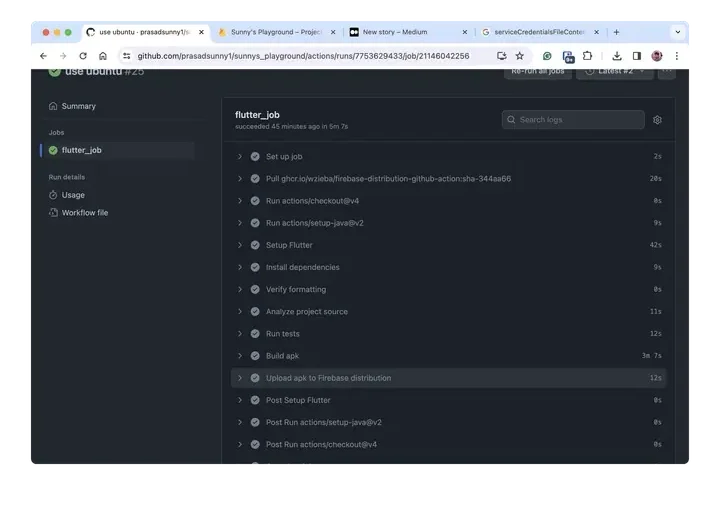
Firebase distribution action ran and a new build was uploaded
Final build.yml can be found here _https://github.com/prasadsunny1/sunnys_playground/blob/f805b22d3185a2430b0834a8b6143392c2b1d6b1/.github/workflows/build.yml_
# Note: In a yml each level is padded by 2 spaces
name: Flutter

on:
  # Runs this action when you push on master
  push:
    branches: [ "master" ]
  # Runs this when a PR against master is created
  pull_request:
    branches: [ "master" ]

jobs:
  flutter_job:

    # The machine, we can also use windows-latest or ubuntu-latest
    # We are choosing macos-latest because we will be also building for iOS
    runs-on: ubuntu-latest

    steps:

      # Clones the project on the machine
      - uses: actions/checkout@v4

      # Sets up java 11
      - uses: actions/setup-java@v4
        with:
          distribution: 'zulu'
          java-version: '11'

      # Installs flutter and related dependency on this machine
      - name: Setup Flutter
        uses: subosito/flutter-action@v2
        with:
          channel: 'stable'
          # flutter-version: '3.16.8'
          # ^ If you want to use a specific version of flutter

      # Fetches proj dependencies from pub
      - name: Install dependencies
        run: flutter pub get
        # ^ If you want to use a specific version of flutter

      # Verifies if the dart code is formatted well
      - name: Verify formatting
        run: dart format --output=none --set-exit-if-changed .
        # --set-exit-if-changed stops execution if the any code is not well formatted
        # --output=none prints files which needs to be formatted

      # Checks for Symantic errors. Can be configured using analysis_options.yaml
      - name: Analyze project source
        run: flutter analyze --fatal-warnings
        # optionally use --fatal-warnings to stop execution if any warnings are found

      # Runs unit test
      - name: Run tests
        run: flutter test

      # Create android apk
      - name: Build apk
        run: flutter build apk

        # Upload apk to Firebase distribution
      - name: Upload apk to Firebase distribution
        uses: wzieba/Firebase-Distribution-Github-Action@v1.7.0
        with:
          appId: ${{ secrets.FIREBASE_APP_ID_ANDROID }}
          serviceCredentialsFileContent: ${{ secrets.SERVICE_CREDENTIALS_FILE_CONTENT }}
          groups: all_testers
          file: build/app/outputs/flutter-apk/app-release.apk
_Continue reading …_
For any Queries and Feedback:
Originally published on Medium.